Building an AI Content Engine: A Full-Stack Guide to Autonomous Reel Production
The full stack, the tools, and a master prompt to build your own agentic workflow.
I'm building a portfolio of mobile apps as a solo founder, and somewhere along the way I decided that if AI can do something, I should probably let it. My job is taste, direction, and quality control. Everything else gets automated.
Content creation was one of the obvious candidates. I want to post four Instagram Reels a day for my app. That's 28 reels a week. If each one takes ~30 minutes to produce manually (finding clips, editing in CapCut, adding text, exporting, uploading, questioning my life choices), that's 14 hours a week on production alone. I don't have 14 hours. I barely have 14 hours for everything that isn't reel production.
So I built an agentic system to complete this task for me.
Here's how it works:
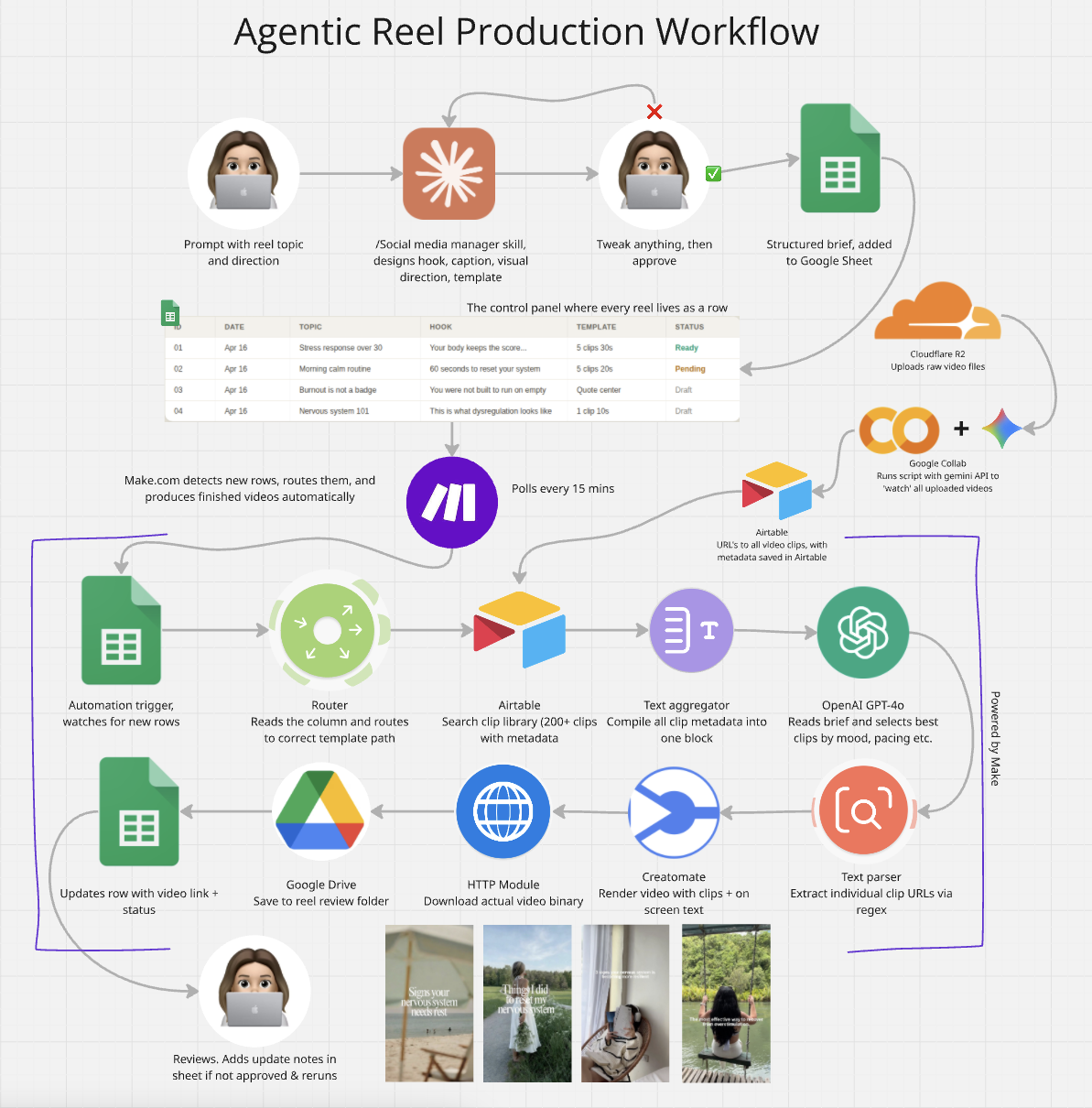
I message Claude 👉 Claude's custom social media skill designs the full reel (hook, caption, visual direction, template) 👉 I review and approve 👉 brief gets pasted into a Google Sheet 👉 Make.com detects the new row 👉 OpenAI selects the best clips from my library 👉 Creatomate renders the video 👉 finished reel lands in my Google Drive
The whole loop takes about 2 minutes from sheet to finished video and I built the entire agentic workflow in two days.
This article is the full breakdown: what I built, the tools I used, the problems I hit (there were many), and how it all fits together. At the end, there's a master prompt you can paste into an LLM to get step-by-step instructions for building your own version, so you can skip the arguing.
The full process, start to finish
The system has three layers: a creative brain, a content queue, and a production engine.
Layer 1: The creative brain (Claude with a custom skill)
I built a Claude skill specifically for my brand's social media management. It knows the tone of voice, the positioning, the content strategy, the funnel stages, the caption rules, the CTA formats, everything. When I message it "Create me a reel about nervous system regulation for people over 30" it doesn't just write a caption. It designs the entire reel: the hook, the on-screen text, the visual direction for clip selection, the caption, the CTA, and which video template to use.
I review the output in the chat, tweak anything that doesn't feel right, and approve it. Then the skill formats everything into a structured brief that maps directly to my Google Sheet columns. I copy it into the sheet, and that's my job done.
This is the part I want to be really clear about: the human stays in the loop on the creative side. AI handles production. I handle taste. The hook, the angle, the emotional tone of a piece of content, that still needs a person who understands the audience making the call. An AI can generate a technically correct reel all day long, but if the hook doesn't stop the scroll, it doesn't matter how good the automation is. AI plus human taste is what makes this work. AI alone produces volume. Volume without taste is just spam.
Layer 2: The content queue (Google Sheets)
The sheet is the control panel. Each row is a reel brief with columns for ID, date, topic, content type, funnel stage, format, hook, reel structure, on-screen text, caption, CTA, clip direction, status, video link, notes, template name, and template ID. Claude fills all of this out for me. I just paste it in.
Layer 3: The production engine (Make.com)
Make.com polls the sheet every 15 minutes looking for new rows. When it finds one, the automation kicks in:
A Router reads the template column and sends the row down the correct production path. Airtable is searched for available video clips matching the brief. A text aggregator compiles all clip metadata into a single block. OpenAI reads the brief and clip library, then selects the best-matching clips. A text parser extracts the individual clip URLs from OpenAI's response. Creatomate renders the final video using a pre-designed template, the selected clips, and the on-screen text. An HTTP module downloads the rendered video file. Google Drive saves it to a folder. Google Sheets updates the original row with the video link and marks it ready for review.
I add a row, go do something else, and come back to a finished reel.
The tool stack
Cloudflare R2 for clip storage. I have 200+ UGC-style video clips stored in an R2 bucket with public URLs. R2 is essentially free object storage with no egress fees, which matters when you're pulling clips multiple times a day. I initially considered just using Google Drive for this, but Drive has terrible direct-link support for video rendering engines. You can't just grab a stable public URL from a Drive file and hand it to Creatomate, because Drive wraps everything in redirect URLs and viewer pages. R2 gives you a clean, permanent public URL per file, and the cost is effectively zero.
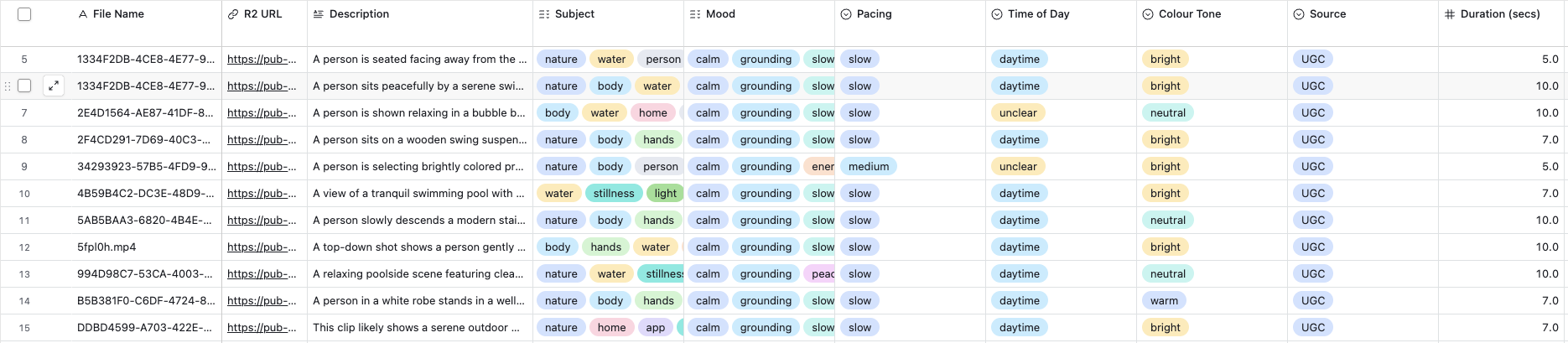
Google Colab + OpenAI GPT-4o-mini for cataloguing clips. I had 200+ clips and no time to manually watch each one and tag what it contained. But the AI clip selector needs to know what each clip actually shows: its mood, subject, pacing, colour tone. Sending all 200+ clips to an LLM to watch every single time a reel is produced would be prohibitively expensive. So instead, I ran a one-off cataloguing process: a Google Colab script that sent each clip to GPT-4o-mini, which described its visual properties. That metadata gets stored in Airtable, and from then on, the clip selector only needs to read text descriptions rather than watching video files every time.
I initially tried Gemini for this because the free tier was appealing, but it kept timing out on the video analysis. Moving to OpenAI's API solved the reliability problem immediately.
Airtable as the clip database. Every clip has a record with its R2 URL, description, subject, mood, pacing, time of day, colour tone, duration, tags, and source (UGC, AI-generated, or filmed by me). I also added a "Content" field to distinguish between clips of people and clips of scenes or landscapes. There's a separate Image Library table ready for background images on quote-style reels.
Google Sheets as the control panel. One sheet where each row is a reel brief, with columns covering everything from the creative brief through to the production output.
Make.com as the orchestrator. This is where the entire workflow lives. A scenario with a Router that splits into different paths depending on which template the reel needs.
OpenAI GPT-4o as the clip selector. Inside Make, an OpenAI module reads the reel brief and the full clip library metadata, then selects the right clips based on mood, subject, pacing, and colour tone matching.
Creatomate for video rendering. I have five templates: a 30-second reel with 5 clips and text overlay, a 20-second version, a 10-second single-clip version, a typewriter quote template, and a centred quote template. Each has dynamic fields that accept clip URLs and text via API.
Google Drive for output storage. Rendered videos land in a designated folder where I review them before posting.
Your clip library is everything
I want to flag something that isn't immediately obvious: the output quality of this entire system is capped by the quality of your clip library. The automation can only stitch together what you give it.
Two things have to be true for this to work well. First, the clips themselves have to be good. If you feed it shaky, poorly lit, or visually inconsistent footage, you'll get shaky, poorly lit, visually inconsistent reels, just produced faster. The automation amplifies whatever you put in. Good clips in, good reels out.
Second, the clips need to be catalogued correctly. The AI clip selector is choosing clips based entirely on text metadata: mood, subject, pacing, colour tone. If a calm sunset clip is tagged as "energetic" or a close-up of hands is described as a "wide landscape," the selector will make bad choices and the reel won't feel coherent. This is exactly why I ran every clip through GPT-4o-mini via the Google Colab script. The AI watches each clip once, describes its visual properties in detail, and that metadata lives in Airtable permanently. From then on, the clip selector reads descriptions instead of watching video, which keeps costs down and accuracy up.
Getting the tagging right is a one-off investment that pays for itself on every single reel the system produces.
How the Make.com scenario is structured
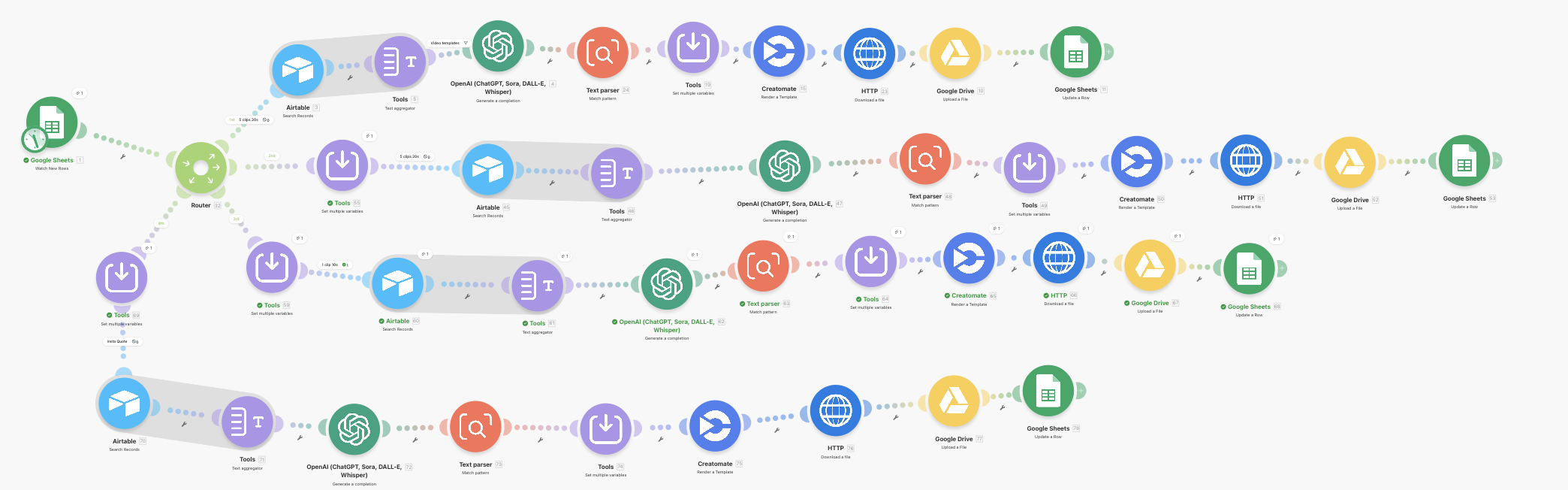
The scenario starts with a Google Sheets trigger that watches for new rows. When it finds one, a Router reads the Template column and sends the row down the correct path.
There are four paths:
Path 1: 5 clips, 30 seconds. The most common reel format. The row goes through Airtable (to fetch the clip library), a Text Aggregator (to compile all clip metadata), OpenAI (to select 5 clips), a Text Parser (to extract individual URLs), Creatomate (to render), an HTTP module (to download the video file), Google Drive (to save it), and Google Sheets (to update the row with the video link).
Path 2: 5 clips, 20 seconds. Identical chain to Path 1, just pointing at a different Creatomate template.
Path 3: 1 clip, 10 seconds. Same chain but OpenAI only selects one clip, and the Creatomate template only has one clip slot.
Path 4: Quote templates. These skip the entire clip selection process because they use a background image instead of video clips. They go straight from the Router to Creatomate, then HTTP, Drive, and Sheets.
Each path has a filter based on the Template column value: "5 clips 30s", "5 clips 20s", "1 clip 10s", "quote typewriter", or "quote center".
The hard parts
I want to be honest about this: building this system involved a lot of debugging, several dead ends, and a fair amount of frustration at Make.com's formula engine. Here's what went wrong and how I fixed each problem.
Getting URLs out of OpenAI's response
This was the single biggest headache. OpenAI returns 5 clip URLs in one text blob. I need each URL in a separate field for Creatomate. Sounds simple. It was not.
I first tried splitting the URLs using Make's built-in split and get functions inside a Set Multiple Variables module. The formulas looked correct but Make wasn't evaluating them. It was treating split() and get() as literal text strings, not functions.
The fix was a Text Parser module using regex. I told OpenAI to separate URLs with ||| instead of newlines (because some filenames had spaces that broke newline splitting), then used a regex pattern with 5 capture groups to extract each URL individually. That worked immediately. Each capture group mapped cleanly into Creatomate's clip fields.
OpenAI hallucinating URLs
This one caught me off guard. OpenAI was supposed to copy URLs exactly from the clip library list. Instead, it was generating URLs that looked right but didn't exist. The filenames were plausible UUID-style strings, but they 404'd when you tried to fetch them.
The fix was aggressive prompt engineering. I added explicit rules about copying URLs character for character, never modifying or reconstructing them, and a warning that every URL would be verified. That tightened things up significantly.
If I were building this again today, I'd also look at using OpenAI's Structured Outputs or JSON Mode for this step. By forcing the model to return a strict JSON schema (something like an array of URL strings), you virtually eliminate the hallucination problem because the model can't return a malformed or fabricated URL without failing schema validation. Prompt engineering works, but schema enforcement is a belt-and-braces approach that would make this even more reliable.
The Google Drive "96 bytes" problem
After getting Creatomate to render successfully, the videos appearing in Google Drive were 96 bytes. Not megabytes. Bytes. Tiny text files.
The problem: the Google Drive module was saving the Creatomate URL as a text file, not downloading the actual video from that URL. The fix was adding an HTTP "Get a File" module between Creatomate and Google Drive. The HTTP module downloads the actual video binary from Creatomate's render URL, and Google Drive uploads that binary. Simple once you know, maddening until you figure it out.
Dynamic text not appearing in rendered videos
The rendered videos kept showing "Your text here" instead of the actual hook text. This was a Creatomate element naming issue. The Make module's field name didn't match the template element name. After renaming the element in Creatomate and refreshing the module in Make, the text started coming through.
I also had to adjust the text box properties in the Creatomate template: setting width to 80%, enabling text wrap, and reducing font size so longer hooks wouldn't overflow off screen.
Cloned modules referencing old paths
When I duplicated the working path to create the 20-second and 10-second variants, every cloned module still referenced modules from the original path. Each one had to be manually re-mapped to the correct module on its new path.
I also hit an issue where cloned modules further down a path couldn't see Google Sheets data from the trigger module at the beginning. The workaround was adding a Set Multiple Variables module right after the Router on each path, which passes the Sheet values forward so downstream modules can access them.
The OpenAI clip selection prompt
Getting the prompt right was iterative. The prompt tells GPT-4o that it's a clip selector. It receives the reel brief (topic, clip direction, content type) and the full clip library with metadata for each clip (URL, mood, subject, pacing, colour tone, source, content type).
The rules are strict: return exactly 5 URLs separated by |||, copy URLs character for character, never mix clips from different sources (all UGC or all AI, never both), prioritise mood and colour tone matching first, then subject, then pacing, avoid duplicates, and prefer variety in composition.
The Clip Direction field in the Google Sheet is where the real magic happens. That's where my Claude social media skill writes specific instructions for each reel: "mood: calm, reflective. pacing: slow. subject: evening scenes, nature, soft lighting. colour tone: warm, golden. UGC only. Scene only. Avoid indoor clips." The more specific the direction, the better the output.
What it actually costs
The system costs practically nothing to run, and I think it's worth putting real numbers on that because the ROI is part of what makes this viable for a solo founder.
Here's the approximate cost per reel:
Tool Cost per reel
OpenAI GPT-4o (clip selection) ~£0.01
Creatomate (1 render credit) ~£0.15
Make.com (5-7 operations) ~£0.02
Total ~£0.18 per reel
At four reels a day, that's roughly £0.72 a day, or about £22 a month. For 120 reels a month. Compare that to the 14 hours a week I was looking at doing this manually, and the maths speaks for itself.
What I'd do differently
If I were starting from scratch, I'd use the Creatomate HTTP API directly instead of the native Make module. The native module auto-detects template fields but sometimes fails to recognise text elements, and you can't manually add or rename modification fields. An HTTP module with a raw JSON body gives you full control.
I'd also standardise my R2 filenames from the start. Some of my clips have spaces and (1) in the filenames from duplicate uploads, which causes URL encoding issues downstream. Clean filenames with no spaces, no parentheses, just UUIDs and extensions.
I'd set up the Router and multi-template architecture from day one instead of building a single path and then retrofitting. The cloning and re-mapping process was tedious.
And as I mentioned, I'd use OpenAI's Structured Outputs for the clip selection step from the beginning. Prompt engineering got me there, but structured schema validation would have saved me a lot of the debugging around hallucinated URLs.
Why this changes the game for solo founders
The system produces a finished reel in roughly 2 to 3 minutes of processing time. At £0.18 per reel, I can produce 120 reels a month for less than the cost of a single coffee.
But the real value isn't the time saving or the cost saving. It's what the speed unlocks. When production is nearly free and nearly instant, you stop agonising over one perfect reel and start running experiments. I can test different hooks against the same topic. I can try three different visual styles for the same message and see which one gets saves. I can post four times a day across different content types and watch what people actually engage with, what they share, what drives follows versus what drives profile visits.
You get answers to those questions in days instead of months, because you have the volume to actually test. Instead of guessing what will resonate and then spending 30 minutes producing the guess, I'm producing 20 variations in the time it used to take me to make one and letting the audience tell me what works.
When production is nearly free, your content strategy stops being about making things and starts being about learning things. What hooks stop the scroll? What visual styles get saves? What topics drive follows versus shares? For a solo founder trying to build distribution through organic social, that shift changes everything. The production bottleneck is gone. The creative bottleneck is all that's left, and that's the one I actually want to spend my time on.
What's next: closing the last manual step
Right now the system is semi-automated. There's still one manual step: I review the finished reel in Google Drive and post it to Instagram myself. That's intentional for now, because I want eyes on every piece of content before it goes live while I'm still refining the clip library and templates.
But the next phase is closing that gap. The plan is to extend the Make.com scenario so that once a reel is marked as approved, it automatically publishes to Instagram and TikTok via their APIs, with the caption and hashtags pulled from the same Google Sheet row. Scheduled posting, cross-platform distribution, no manual uploading.
At that point the full loop becomes: I have a conversation with Claude about what content to create this week 👉 Claude designs the reels 👉 briefs land in the sheet 👉 videos render automatically 👉 I review and approve in a batch 👉 they publish on schedule across platforms.
One conversation, a month of content. That's where this is heading.
Try it yourself: the master prompt
If you want to build your own version, paste the following prompt into Claude, ChatGPT, or any capable LLM. It contains everything the model needs to walk you through the setup step by step.
"I want to build a semi-automated Instagram Reel content engine using Make.com, Airtable, OpenAI, Creatomate, Google Sheets, Google Drive, and Cloudflare R2. Walk me through building this step by step.
Here is how the system should work:
I fill in a row in a Google Sheet (or have an AI assistant fill it for me) with: reel topic, content type, funnel stage, format, hook, reel structure, on-screen text, caption, CTA, clip direction, template name, and template ID.
A Make.com scenario detects the new row and routes it based on the template type.
For video reels: Make searches an Airtable clip library, compiles clip metadata, sends it to OpenAI to select the best-matching clips, extracts the clip URLs, sends them to Creatomate to render a video with the clips and on-screen text, downloads the rendered video, saves it to Google Drive, and updates the Google Sheet row with the video link.
For quote/image reels: Make skips clip selection and sends the text and background image directly to Creatomate for rendering, then follows the same download, save, and update process.
Here is what I need you to help me set up:
STEP 1: CLIP LIBRARY
Set up a Cloudflare R2 bucket for storing short video clips (5-30 seconds each)
Upload clips and make the bucket publicly accessible
Create an Airtable base with a "Clip Library" table containing fields: File Name, R2 URL, Description, Subject, Mood, Pacing, Time of Day, Colour Tone, Duration, Tags, Source (UGC/AI/Original), Content (Person/Scene)
Use an LLM (via Google Colab or similar) to analyse each clip and populate the metadata fields automatically, so you don't have to manually watch and tag hundreds of clips
STEP 2: GOOGLE SHEET
Create a Google Sheet as a content queue with these columns: ID, Created Date, Reel Topic, Content Type, Funnel Stage, Format, Hook, Reel Structure, On-Screen Text, Caption, CTA, Clip Direction, Status, Final Video Link, Notes, Template, Template ID
STEP 3: CREATOMATE TEMPLATES
Create video templates in Creatomate with dynamic fields for clip URLs (clip_1_url through clip_5_url) and on-screen text
Create quote templates with dynamic fields for background image and message text
Make sure all dynamic elements have the "Dynamic" checkbox ticked on the correct property (Source for media, Text for text elements)
Note each template's ID
STEP 4: MAKE.COM SCENARIO
Module 1: Google Sheets "Watch New Rows" trigger, polling every 15 minutes
Module 2: Router that reads the Template column and routes to different paths
For each video template path:
Airtable: Search Records in the Clip Library table (limit 200, return all metadata fields)
Text Aggregator: Compile clip data as "R2 URL | Mood | Subject | Pacing | Colour Tone | Source | Content" per clip
OpenAI: GPT-4o with a prompt that receives the brief and clip list, selects the right number of clips, returns URLs separated by |||
Text Parser: Match Pattern using regex to extract individual URLs into capture groups
Creatomate: Render a Template using the template ID from the sheet, mapping clip URLs from the Text Parser and on-screen text from the sheet
HTTP: Get a File from the Creatomate render URL (this downloads the actual video binary)
Google Drive: Upload a File to a designated folder, using the HTTP module's data as the file source
Google Sheets: Update a Row to set the status and paste the Google Drive video link
For each quote template path:
Creatomate: Render a Template with the message text and background image URL
HTTP: Get a File from the render URL
Google Drive: Upload a File
Google Sheets: Update a Row
KEY TECHNICAL DETAILS:
OpenAI must return URLs separated by ||| (not newlines), because some filenames contain spaces
The Text Parser regex for 5 URLs: (https?://[^|]+)|||(https?://[^|]+)|||(https?://[^|]+)|||(https?://[^|]+)|||(https?://[^|]+)
Use capture groups $1 through $5 to map into Creatomate clip fields
The HTTP "Get a File" module between Creatomate and Google Drive is essential, otherwise Drive saves the URL as a text file instead of downloading the actual video
Google Drive should use the HTTP module as the file source (not Map mode with a URL)
Each Router path needs its own filter based on the Template column value
When cloning paths for additional templates, re-map every module reference to point to the correct module on the new path
If downstream modules can't see Google Sheets data, add a Set Multiple Variables module early in the path to pass the values forward
OPENAI CLIP SELECTION PROMPT: The OpenAI prompt should include:
The reel brief (topic, clip direction, content type)
The full clip library with metadata
Rules: return exact number of URLs separated by |||, copy URLs exactly as they appear (never modify or hallucinate), never mix sources (all UGC or all AI), prioritise mood and colour tone match, avoid duplicates, prefer composition variety
If URLs contain spaces, encode them as %20
Walk me through each step one at a time. Ask me what tools I already have set up, what my clip library looks like, and what templates I need. Then guide me through the Make.com scenario module by module."

Kate Krekis is an AI-native marketer, product builder, and the writer behind The Vibe Marketing Journal, where she explores the shift from traditional marketing to AI-first operating models. With a background in senior growth and product marketing, she now builds full products end-to-end as a solo founder, vibe coding mobile apps, designing AI agents and agentic workflows, and shipping real systems that run in production. The Vibe Marketing Journal documents her experiments, frameworks, and what she's learning along the way.